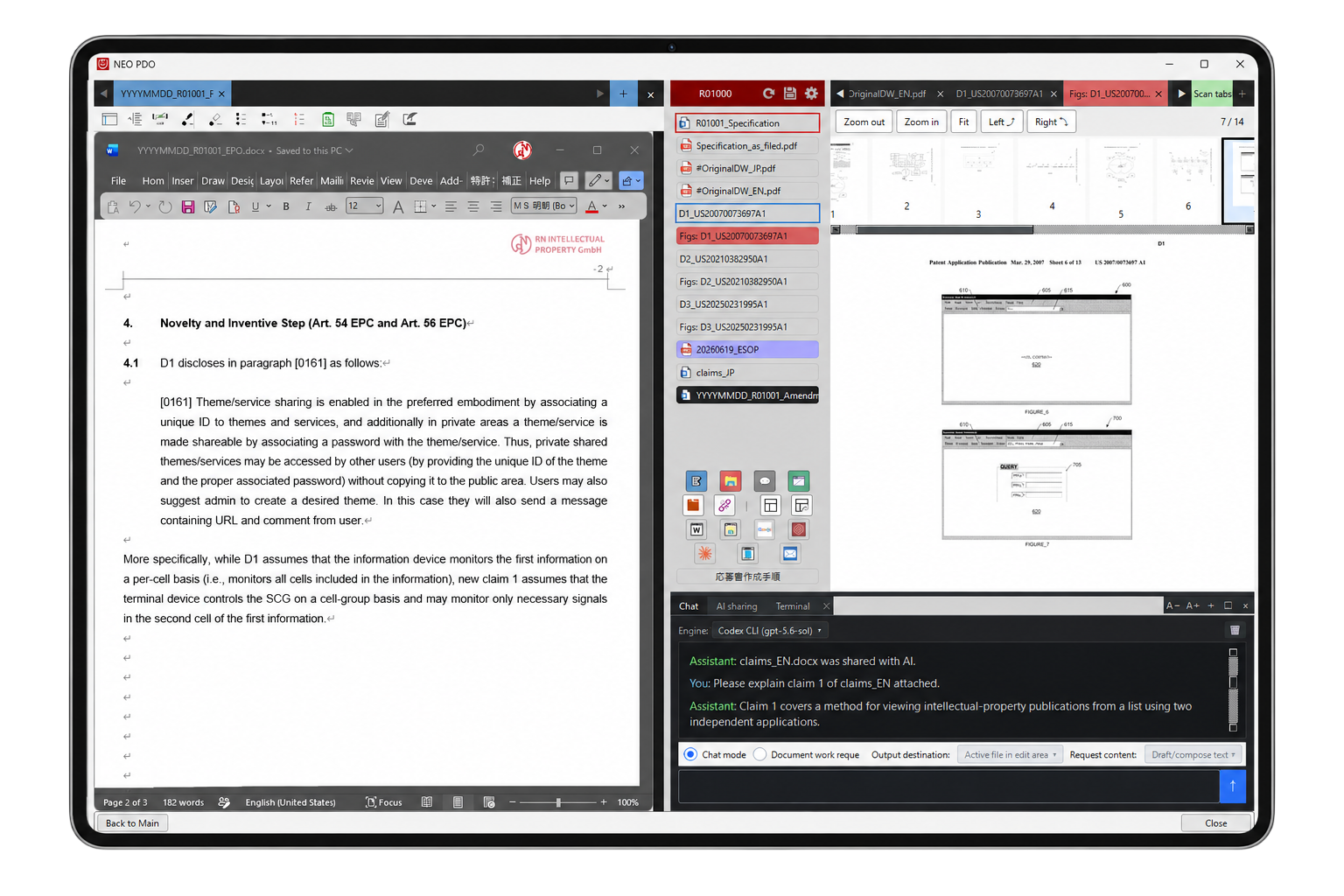
An original multi-viewer
NEO PDO includes an original multi-viewer that handles Word, PowerPoint, Excel, PDF, web pages, patent drawings, e-mail, and Explorer.
There is no need to reopen each reference in a separate application: documents, drawings, spreadsheets, web information, e-mail, and files in a folder can all be reviewed by switching between them on a single work screen.
Multiple references can be kept open as tabs, so you can move back and forth between the information you need and view, compare, and edit it smoothly.
Build your working environment automatically from an official communication
Dropping an official communication onto the "OCR analysis of official communications" window extracts information on the publication of the application at issue and on the cited references, and NEO PDO then collects those publications and documents automatically from the network.
Once collection is complete, a viewing area for displaying the documents and a control panel with buttons for switching between them are launched. The jurisdictions covered by the analysis are EP, US, JP, and CN, as well as WO-ISA documents incorporated in EP proceedings. During the automatic collection process, publication PDFs and image files for the drawing viewer are also saved automatically.
Simply dropping an official communication prepares the documents you need, so you can start working right away.
Interact with AI that understands the prosecution history
You can classify patent documents such as specifications, claims, official communications, and cited references and share that information with AI. This allows you to interact with AI that understands the prosecution history throughout the patent prosecution process.
You can also create your own classifications and share non-patent information with AI for uses beyond prosecution.
The "AI Sharing" tab shows both the information being shared with AI and any information excluded from sharing for security reasons.
Send selected text
With NEO PDO, quoting text does not require selecting it and then copying and pasting: the selected text is simply “sent” to the position you want.
Pressing "Ctrl+C" together with an arrow key (in the direction where the editing area is placed) sends the selected text to the file being edited. Pressing "Ctrl+C" with "↑/↓" steps back through the last three cursor positions in the editing area, and the text is sent to the position where you release "Ctrl+C".
Quoting from a document shown in the viewing area, or from an amendment you are editing in parallel, becomes remarkably easy. Freeing you from repeated paste operations significantly improves work efficiency.
AI Writing Check
The AI engine you specify checks the entire document or a specified range of text and uses comments and history to present suggested revisions, making the proposal and the affected text immediately clear.
Hovering displays accept/reject controls, so you can process each suggestion in sequence.
See all features here